News
KinVisa now puts writing, photos and documents in one PDF
Write in your own words, add labelled photos and attach documents such as statements and tickets, in one PDF made on your computer.
Republish this storyA new version of KinVisa for Windows and Apple silicon Macs goes beyond photos. A document can now hold the couple’s own words, photos with the people in them labelled, and other files such as bank statements, leases and tickets, put together into one A4 PDF on the user’s computer.
Users can make a separate document for each part of their evidence, named in their own words, such as Financial aspects or Social aspects. Every document goes through the same five steps: Name, Writing, Photos, Documents and Download.
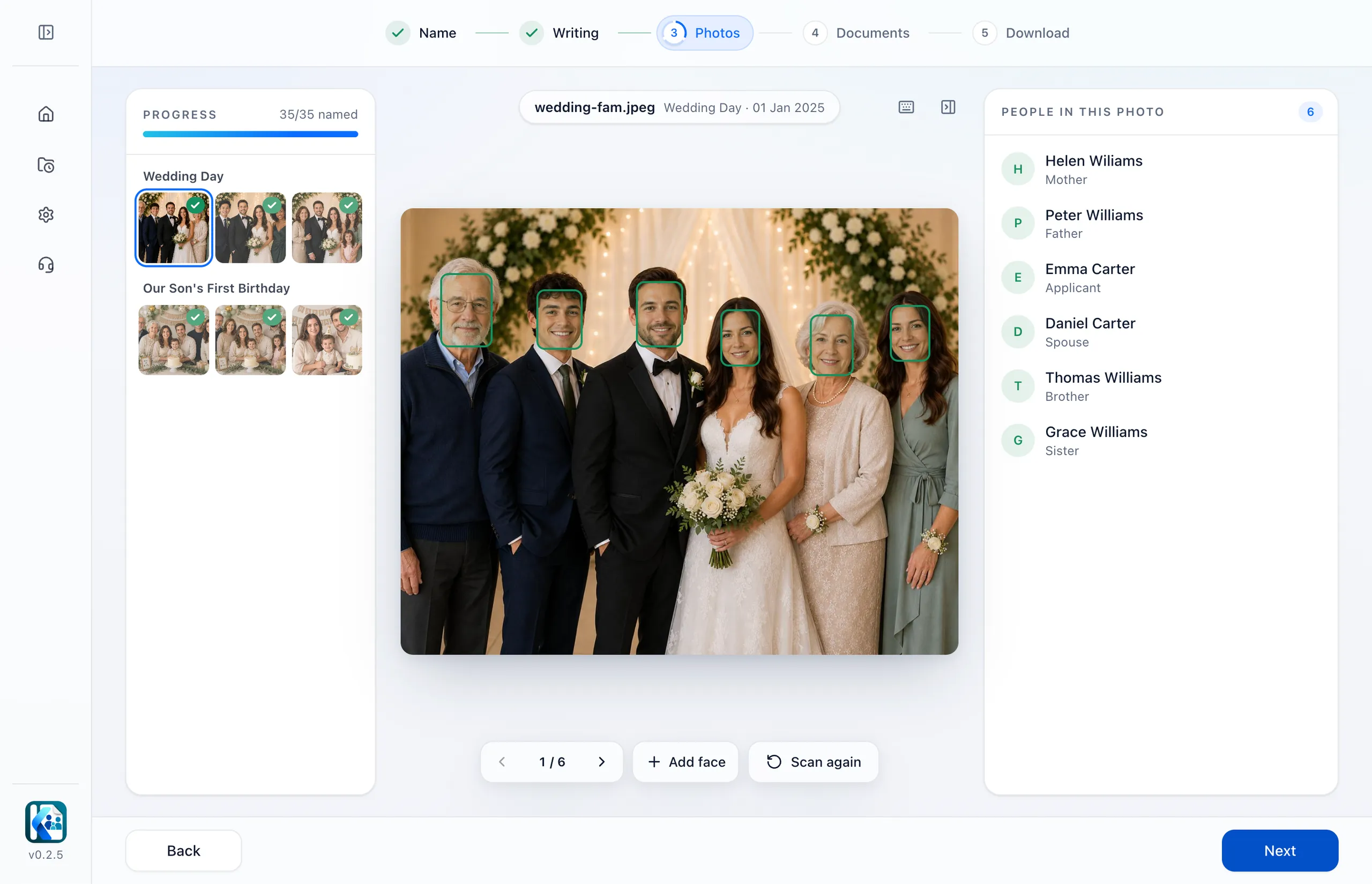
One workflow for every document
- Name the document. Each document starts with a name, which appears on its cover. When the name matches a part of the evidence, such as financial or social, the Documents step can show examples of documents for that part.
- Write in your own words. An optional writing page offers headings, lists, tables and text formatting. What is written there is printed into the PDF under “In our own words”, and its headings appear in the contents page.
- Photos in one step. Sections, on-device face detection and matching, and captions now sit together in the Photos step. Label a person once and KinVisa suggests the same label when they appear again; captions can be built from those labels or written by hand.
- Attach other documents. Add PDF, Word (.docx) and image files. Each gets a heading page with its name and an optional date and description, followed by the original. Attached PDFs are added page for page rather than redrawn, and Word files are converted on the computer. A file already in the document is added once, and the app says when a file is already in another of the user’s documents.
- Add from phone. Documents on a phone can be sent straight to the computer. The user scans a QR code, allows the phone on the computer and picks the files, which travel over the local Wi-Fi without passing through KinVisa’s servers.
- Fit the upload limit. Set a maximum file size, 5 MB to start with. KinVisa compresses the whole PDF on the computer to fit. If it would no longer be easy to read, the user chooses between splitting it into numbered parts and keeping one file at lower quality.
- Preview, colours and cost. A watermarked preview updates as the settings change. Five colour themes are available: Default, Dark, Sand, Sage and Plum. Before saving, a Cost line shows whether the save uses a credit or is free. Changing the size limit costs nothing unless the PDF has to be made smaller.
On first sign-in, users can enter the applicant’s and partner’s names, which appear on each document’s cover, and choose their visa from 15 Australian and New Zealand family and partner visas. The document is laid out for the Australian Partner visas (subclasses 820, 801, 309 and 100), the New Zealand Citizen Family Relationship visa (461) and the Prospective Marriage visa (300), which has its own evidence groups.
Writing, photos, attached documents and face data stay on the user’s computer. Accounts, credit balances, payments, support and usage statistics use online services, so an internet connection is still part of using the app.
Saving a new document uses one PDF credit, and saving an unchanged document again is free. Credits are bought in one-off packs of 3, 5 or 10, do not expire, and there is no subscription. Current prices are listed on the website’s pricing page.
The app organises the material the user chooses to provide. It does not select evidence, verify relationships, identities or documents, provide immigration or legal advice, or guarantee application outcomes. KinVisa is an independent software product and is not affiliated with any government.
Downloads for Windows and Apple silicon Macs are available at kinvisa.com/downloads.
About KinVisa
KinVisa is an independent desktop app for putting relationship evidence into structured PDF documents. It combines the user’s own words, photo sections with people labels and captions, and attached documents, with processing on the user’s computer.
Press contact
Momin
Email [email protected]. Logos, screenshots and a fact sheet are in the press kit.