News
KinVisa is now available
Organise relationship photos, label the people in them, and create a clear PDF. Available for Windows and Apple silicon Macs.
Republish this storyKinVisa is now available for Windows and Apple silicon Macs. It turns relationship and family photos into an organised PDF that can be used as supporting documentation for a partner, spouse or family visa application. Photo organisation, people labels, captions and document layout are brought together in one desktop app.
It started with a family member’s spouse visa paperwork. The photos were already there; the work was sorting them into events, identifying the people pictured, adding context and formatting everything consistently. Momin built KinVisa to bring those steps into one place and reduce the repeated copying, labelling and page formatting.
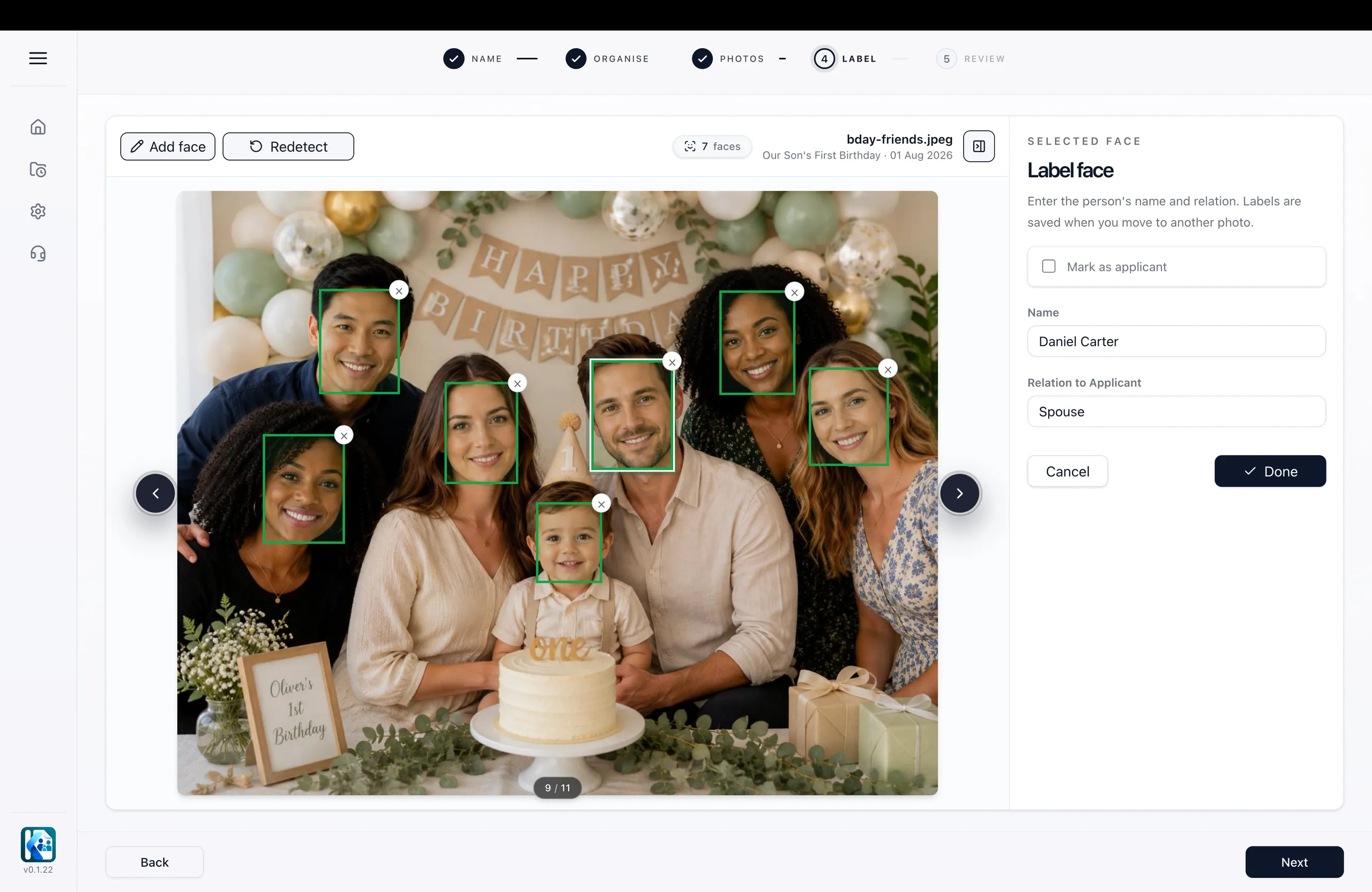
From photos to a document
- Sections with context. Group photos into named sections for an event, a trip together or a particular year. Each section can carry a date or date range and a short description. This gives the document a structure and keeps the surrounding context with the photos as they move into the PDF.
- Names without the repetition. KinVisa finds faces in imported photos. Label a person with their name and relationship to the applicant, and on-device face matching suggests the same label when that person appears again. Every suggestion can be checked and corrected. Relationships are entered by the user; they are not inferred from a photograph.
- Captions you can edit. Captions are assembled from the names and relationships you have entered, following the people shown from left to right. That carries the labelling work into the document without repeatedly typing the same names. Each caption remains editable, so the wording can be reviewed and changed before the PDF is saved.
- A4 layout handled in the app. Photos, section headings, dates, descriptions and captions are arranged on A4 pages. A linked contents page helps readers move between sections in a multi-section document. The layout brings the material into a consistent format, so the user can focus on reviewing the photos and their context.
- Control over size and presentation. Choose from five PDF colour themes and set a target file size, with 5 MB as the default. KinVisa adjusts compression towards that target where possible. This brings file size and presentation into the same workflow as photo organisation, with the resulting document available to inspect in the preview.
- Preview first, then save. Building a document and previewing all its pages are free. The preview carries a watermark; the saved PDF does not. This gives users a chance to inspect the layout, read the captions and check the people labels before deciding to spend a credit on saving that version.
Photo processing stays on the user’s computer. Imported photos, face detection and matching, captions, layout and PDF generation are handled locally, without uploading photos for processing. Accounts, credit balances, payments, support and usage statistics use online services, so an internet connection is still part of using the app.
Saved documents remain on the computer and can be reopened from History. Saving the same unchanged version again uses no additional credit. Changes to photos, captions, section details, the document title, size target or colours create a new version, which uses another credit when saved.
KinVisa is free to download. Saving a new document version uses one PDF credit, purchased in one-off packs of 3, 5 or 10. Credits do not expire, and there is no subscription. Current prices are listed on the website’s pricing page.
The app organises the photos and information the user chooses to provide. It does not select evidence, verify relationships or identities, provide immigration or legal advice, or guarantee application outcomes. KinVisa is an independent software product and is not affiliated with any government.
Downloads for Windows and Apple silicon Macs are available at kinvisa.com/downloads. A sample PDF, screenshots, a fact sheet and the press kit are available at kinvisa.com/press.
About KinVisa
KinVisa is an independent desktop app for organising relationship and family photos into structured PDF documents. It combines photo sections, people labels, editable captions and automatic A4 layout, with photo processing on the user’s computer.
Press contact
Momin
Email [email protected]. Logos, screenshots and a fact sheet are in the press kit.